


Next: How to find and Up: About the Software Examples
Previous: About the Software Examples Contents
Index
Pd documents are called ``patches." They
correspond roughly to the boxes in the abstract block diagrams
shown earlier in this chapter, but in detail they are quite
different, reflecting the fact that Pd is an implementation
environment and not a specification language.
A Pd patch, such as the one shown in Figure
1.6, consists of a collection of boxes connected in a network called a
patch. The border of a box
tells you how its text is interpreted and how the box functions. In
part (a) of the figure we see three types of boxes. From top to
bottom they are:
- a message box. Message boxes, with a flag-shaped
border, interpret the text as a message to send whenever the box is
activated (by an incoming message or with the mouse.) The message
in this case consists simply of the number ``34".
- an object box. Object boxes have a rectangular
border; they use the text to create objects when you load a patch.
Object boxes may represent hundreds of different classes of
objects--including oscillators, envelope generators, and other
signal processing modules to be introduced later--depending on the
text inside. In this example, the box contains an adder. In most Pd
patches, the majority of boxes are of type ``object". The first
word typed into an object box specifies its class, which in this case is just ``+". Any
additional (blank-space-separated) words appearing in the box are
called creation arguments, which specify the initial
state of the object when it is created.
- a number box. number boxes are a particular case of
a GUI
box, which also include push buttons, toggle switches, sliders,
and more; these will come up later in the examples. The number box
has a punched-card-shaped border, with a nick out of its top right
corner. Whereas the appearance of an object or message box is
static when a patch is running, a number box's contents (the text)
changes to reflect the current value held by the box. You can also
use a number box as a control by clicking and dragging up and down,
or by typing values in it.
In fig. 1.6(a) the
message box, when clicked, sends the message ``21" to an object box
which adds 13 to it. The lines connecting the boxes carry data from
one box to the next; outputs of boxes are on the bottom and inputs
on top.
Figure 1.6: (a) three
types of boxes in Pd (message, object, and GUI); (b) a simple patch
to output a sinusoid.
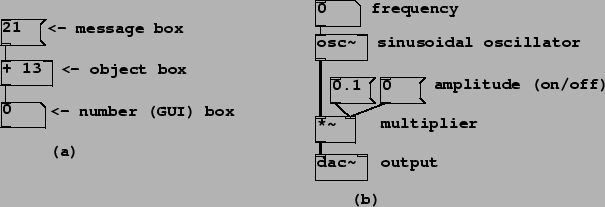 |
Figure 1.6(b) shows a Pd
patch which makes a sinusoid with controllable frequency and
amplitude. The connecting patch lines are of two types here; the
thin ones are for carrying sporadic messages, and the thicker ones (connecting the
oscillator, the multiplier, and the output ``dac ") carry
digital audio signals. Since Pd is a real-time program, the audio
signals flow in a continuous stream. On the other hand, the
sporadic messages appear at specific but possibly unpredictable
instants in time.
Whether a connection carries messages or signals
is a function of the box the connection comes from; so, for
instance, ``+" outputs messages, but ``*~" outputs a signal. The
inputs of objects may or may not accept signals (but they always
accept messages, even if only to convert them to signals). As a
naming convention, object boxes which input or output signals are
all named with a trailing tilde (``~") as in ``*~" and
``osc~".
Next: How to find and Up: About the Software Examples
Previous: About the Software Examples Contents
Index
Miller Puckette 2005-07-11