


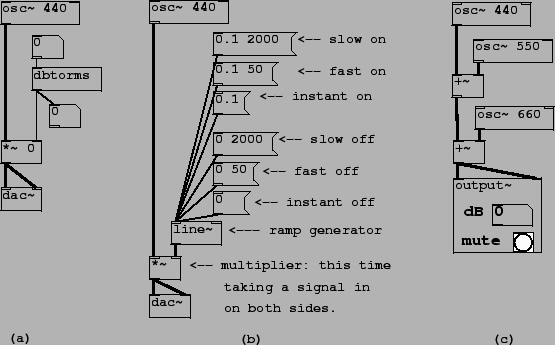
Patch A02.amplitude.pdshows how to make a crude amplitude control; the active elements are shown in figure 1.11(a). There is one new object class:
 |
 : Decibels to
amplitude conversion. The ``RMS" is a misnomer; it should have been
named ``dbtoamp", since it really converts from decibels to any
linear amplitude unit, be it RMS, peak, or other. An input of 100
dB is normalized to an output of 1. Values greater than 100 are
fine (120 will give 10), but values less than or equal to zero will
output zero (a zero input would otherwise have output a small
positive number.) This is a control object, i.e., the numbers going
in and out are messages, not signals. (A corresponding object,
: Decibels to
amplitude conversion. The ``RMS" is a misnomer; it should have been
named ``dbtoamp", since it really converts from decibels to any
linear amplitude unit, be it RMS, peak, or other. An input of 100
dB is normalized to an output of 1. Values greater than 100 are
fine (120 will give 10), but values less than or equal to zero will
output zero (a zero input would otherwise have output a small
positive number.) This is a control object, i.e., the numbers going
in and out are messages, not signals. (A corresponding object,
 , is the signal
correlate. However, as a signal object this is expensive in CPU
time and most often we'll find one way or another to avoid using
it.)
, is the signal
correlate. However, as a signal object this is expensive in CPU
time and most often we'll find one way or another to avoid using
it.)
The two number boxes are connected to the input and output of
the dbtorms object. The input functions as a control;
``mouse" on it (click and drag upward or downward) to change the
amplitude. It has been set to range from 0 to 80; this is
protection for your speakers and ears, and it's wise to build such
guardrails into your own patches.
The other number box shows the output of the
dbtorms object. It is useless to mouse on this number
box, since its outlet is connected nowhere; it is here purely to
display its input. Number boxes may be useful as controls,
displays, or both, although if you're using it as both there is
some extra work to do.