The
 class, while handy and
efficient, is somewhat specialized and for many of the applications
described in this chapter we need something more general. Patch
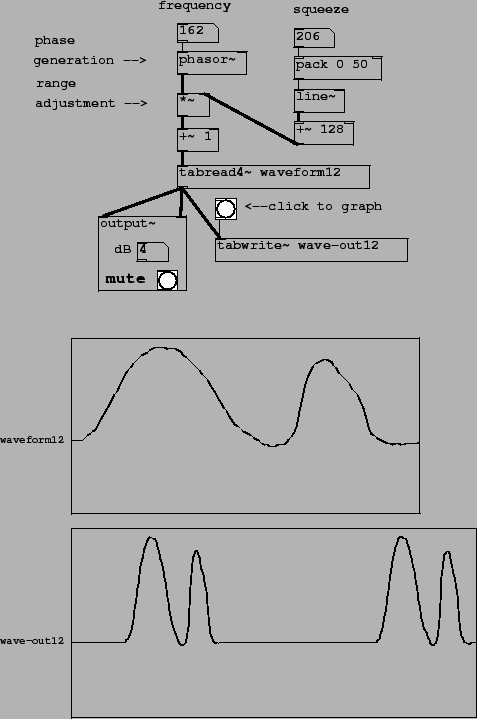
B03.tabread4.pd (Figure 2.13) demonstrates
the timbre stretching technique discussed in section 2.4. This is a simple example of
a situation where
would not have
sufficed. There are new classes introduced here:
class, while handy and
efficient, is somewhat specialized and for many of the applications
described in this chapter we need something more general. Patch
B03.tabread4.pd (Figure 2.13) demonstrates
the timbre stretching technique discussed in section 2.4. This is a simple example of
a situation where
would not have
sufficed. There are new classes introduced here:
 : wavetable lookup. As in
, the table is read
using 4-point interpolation. But whereas
takes a frequency as
input and automatically reads the waveform in a repeating pattern,
the simpler
: wavetable lookup. As in
, the table is read
using 4-point interpolation. But whereas
takes a frequency as
input and automatically reads the waveform in a repeating pattern,
the simpler
 expects the table
lookup index as input. If you want to use it to do something
repetitious, as in this example, the input itself has to be a
repeating waveform. Like
(and all the other
table reading and writing objects), you can send messages to select
which table to use.
expects the table
lookup index as input. If you want to use it to do something
repetitious, as in this example, the input itself has to be a
repeating waveform. Like
(and all the other
table reading and writing objects), you can send messages to select
which table to use.
 : record an audio signal into a wavetable. In
this example the
: record an audio signal into a wavetable. In
this example the
 is used to display the
output (although later on it will be used for all sorts of other
things.) Whenever it receives a ``bang" message from the button
icon above it,
begins writing
successive samples of its input to the named table.
is used to display the
output (although later on it will be used for all sorts of other
things.) Whenever it receives a ``bang" message from the button
icon above it,
begins writing
successive samples of its input to the named table.
Patch B03.tabread4.pd shows how to combine a
 and a
object to make a
wavetable oscillator. The
's output ranges from 0 to
1 in value. In this case the input wavetable, named ``waveform12",
is 131 elements long. The domain for the
object is thus from 1
to 129. To adjust the range of the
accordingly, we multiply
it by the length of the domain (128) so that it reaches between 0
and 128, and then add 1, effectively sliding the interval to the
right by one point. This rescaling is accomplished by the
and a
object to make a
wavetable oscillator. The
's output ranges from 0 to
1 in value. In this case the input wavetable, named ``waveform12",
is 131 elements long. The domain for the
object is thus from 1
to 129. To adjust the range of the
accordingly, we multiply
it by the length of the domain (128) so that it reaches between 0
and 128, and then add 1, effectively sliding the interval to the
right by one point. This rescaling is accomplished by the
 and
and  objects between
the
and the
.
objects between
the
and the
.
With only these four boxes we would have essentially reinvented
the
class. In this
example, however, the multiplication is not by a constant 128 but
by a variable amount controlled by the ``squeeze" parameter. The
function of the four boxes at the right hand side of the patch is
to supply the
 object with values to scale
the
by. This makes use of one
more new object class:
object with values to scale
the
by. This makes use of one
more new object class:
 : compose a list of two or more elements. The creation
arguments establish the number of arguments, their types (usually
numbers) and their initial values. The inlets (there will be as
many as you specified creation arguments) update the values of the
message arguments, and, if the leftmost inlet is changed (or just
triggered with a
: compose a list of two or more elements. The creation
arguments establish the number of arguments, their types (usually
numbers) and their initial values. The inlets (there will be as
many as you specified creation arguments) update the values of the
message arguments, and, if the leftmost inlet is changed (or just
triggered with a bang message), the message is output.
In this patch the arguments are initially 0 and 50, but the
number box will update the value of the first argument, so that, as
pictured, the most recent message to leave the  object was ``206 50". The effect of this on the
line~ object below is to ramp to 206 in 50
milliseconds; in general the output of the line~
object is an audio signal that smoothly follows the sporadically
changing values of the number box labeled ``squeeze".
Finally, 128 is added to the ``squeeze" value; if ``squeeze" takes non-negative values (as the number box in this patch enforces), the range-setting multiplier ranges the phasor by 128 or more. If the value is greater than 128, the effect is that the rescaled phasor spends some fraction of its cycle stuck at the end of the wavetable (which clips its input to 129.) The result is that the waveform is scanned over some fraction of the cycle. As shown, the waveform is squeezed into 128/(128+206) of the cycle, so the spectrum is stretched by a factor of about 1/2.
For simplicity, this patch is subtly different from the example
of section 2.4 in that
the waveforms are squeezed toward the beginning of each cycle and
not toward the middle. This has the effect of slightly changing the
phase of the various partials of the waveform as it is stretched
and squeezed; if the squeezing factor changes quickly, the
corresponding phase drift will sound like a slight wavering in
pitch. This can be avoided by using a slightly more complicated
arrangement: subtracting 1/2 from the phasor~,
multiply it by 128 or more, and then add 65 instead of one.