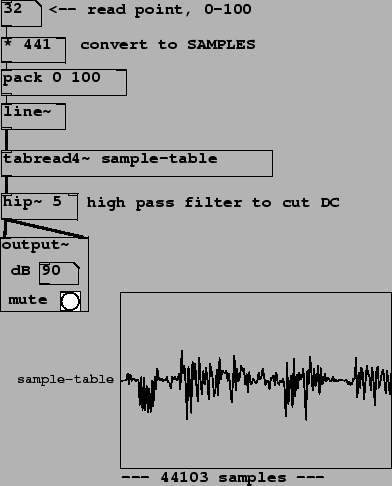
Patch B04.sampler.pd (Figure 2.14) shows how to use a wavetable as a
sampler. In this case the index into the sample (the wavetable) is
controlled by mousing on a number box at top. A convenient scaling
for the number box is hundredths of a second; to convert to samples
(as the input of tabread4~ requires) we multiply by
44100 samples/sec times 0.01 sec to get 441 samples per unit,
before applying pack and line~ in much
the same way as they were used in the previous example. The
transposition you hear depends on how quickly you mouse up and
down. This example has introduced one new object class:
 : simple high-pass (low-cut) filter. The creation
argument gives the rolloff frequency in Hertz. We use it here to
eliminate the constant (zero-frequency) output when the input sits
in a single sample (whenever you aren't actively changing the
wavetable reading location with the mouse.) Filters are discussed
in chapter
: simple high-pass (low-cut) filter. The creation
argument gives the rolloff frequency in Hertz. We use it here to
eliminate the constant (zero-frequency) output when the input sits
in a single sample (whenever you aren't actively changing the
wavetable reading location with the mouse.) Filters are discussed
in chapter ![[*]](file:/usr/share/latex2html/icons/crossref.png) .
.
The pack and line~ in this example are
not merely to make the sound more continuous, but are essential to
making the sound intelligible at all. If the index into the
wavetable lookup simply changed every time the mouse moved a pixel
(say, twenty to fifty times a second) the overwhelming majority of
samples would get the same index as the previous sample (the other
44000+ samples, not counting the ones where the mouse moved.) So
the speed of precession would almost always be zero. Instead of
changing transpositions, you would hear 20 to 50 Hertz grit. (Try
it to find out what that sounds like!)